Back to release notes
v1.1.172026.05

Role-based knowledge permissions and a public embed widget

v1.1.17 lets you grant knowledge access by role — view-only, append-only, or full edit — and adds public share links with revoke and login-required options. We also added a public embed widget so you can drop a Zemu AI agent into your own site or service page by allow-listing the host domains. Editing Markdown tables inside knowledge has been refined as well: adding, removing, and reordering rows and columns is now much more intuitive.

Screenshots

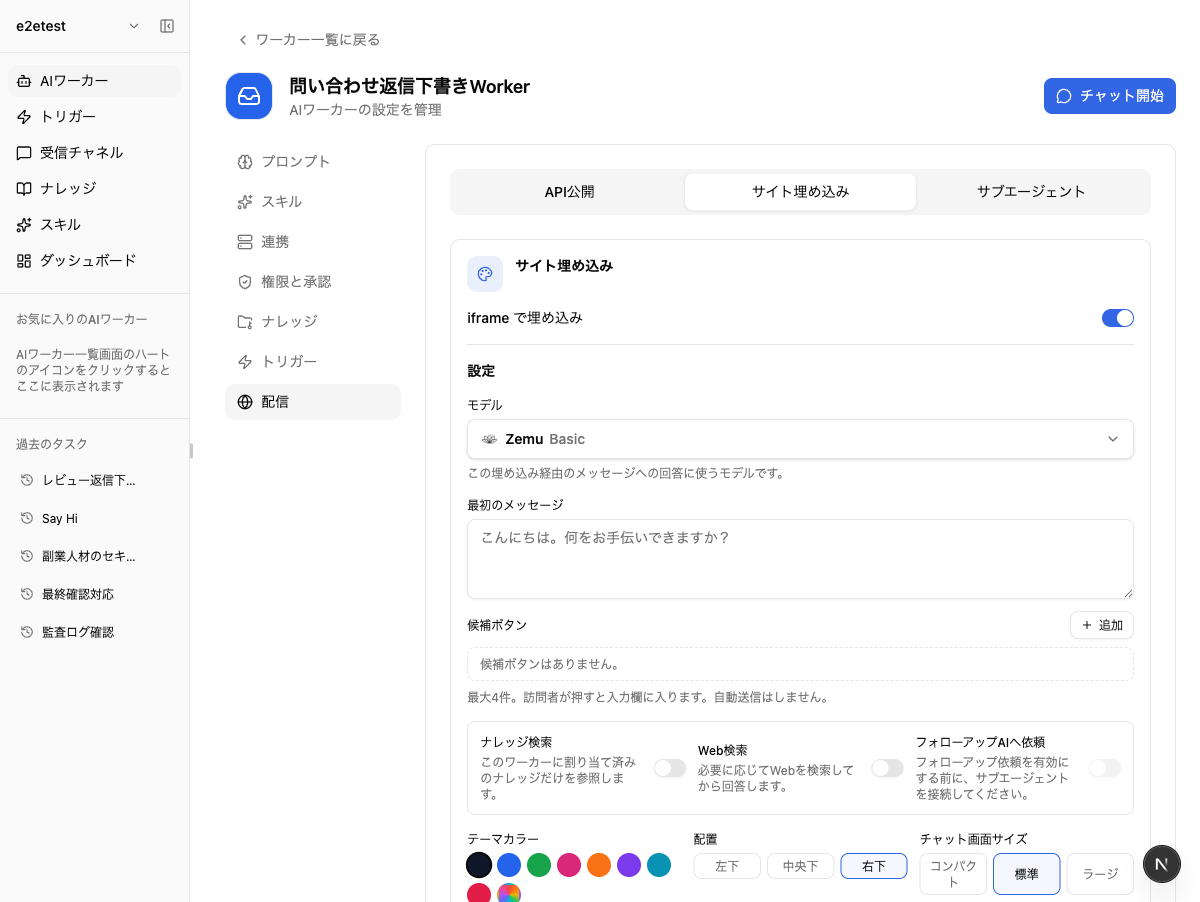
Distribution screen on the AI worker settings page, showing the site embed widget configuration with model selection, greeting, and theme color.
From the Distribution screen's Site Embed tab, enable iframe embedding and configure the model, greeting, suggested replies, theme color, and placement.

Changes

  • Knowledge access can now be granted by role — view-only, append-only, or full edit — and public share links support issuance, revocation, and login-required settings.

  • A new public embed widget lets you drop AI agents into your own site or service page. Configure allow-listed domains, the model used, and usage limits to publish safely.

  • Editing Markdown tables inside knowledge has been refined — adding, removing, and reordering rows and columns is now much more intuitive.